


Apple Pencil (USB-C): Pixel-Perfect Precision for Note-Taking, Drawing, and More
Ask a question
Estimate delivery times: 3-7 days.
Return within 30 days of purchase.
Guaranteed Safe Checkout
Apple Pencil (USB-C): Pixel-Perfect Precision for Note-Taking, Drawing, and More
Condition: Open Box, Grade A, Fully Functional
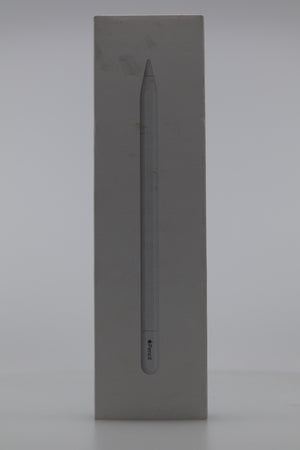
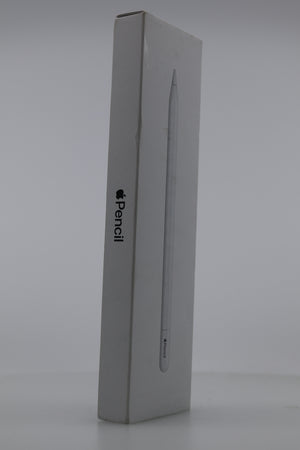
Enhance your iPad with the Apple Pencil (USB-C). Enjoy precision, low latency, and tilt sensitivity. Boost creativity and productivity for drawing, note-taking, and marking up documents.
The Apple Pencil (USB-C) delivers pixel-perfect accuracy. It works instantly with compatible iPads. Use it for art, school, or work tasks. Every stroke and mark appears right when you touch the screen. The low latency means your lines always keep up. Tilt sensitivity lets you shade, sketch, or highlight smoothly. With a balanced weight and thin profile, the Apple Pencil feels natural in hand.
This stylus charges and pairs directly using a USB-C cable. There is no need to worry about additional adapters. Just connect and follow instructions on your device. Magnetic attachment keeps the Pencil secure on the side of your iPad. Store your tool safely when not in use. The design is modern and stylish, fitting perfectly with Apple’s aesthetic.
Compatibility matters. The Apple Pencil (USB-C) works with many iPad models. This includes the iPad Pro 13-inch (M4), iPad Pro 12.9-inch (6th generation), iPad Pro 11-inch (M4), iPad Air 13-inch (M3), iPad Air (5th generation), and iPad mini (6th generation). It also supports select older iPad and iPad Air versions. For a full list, check the support section below or visit Apple’s website. Not all older models are supported, so confirm before buying.
If you are an artist, the Pencil offers additional creative power. The hover feature is available on some models, such as iPad Pro 13-inch (M4) and iPad Air 13-inch (M2). This lets you preview where your Pencil tip will touch. Get more control over every stroke. Note-takers will love the responsive feel. Handwriting input feels like pen on paper. Convert notes to text quickly for efficient class or meeting sessions.
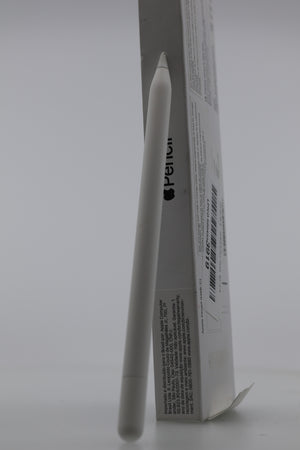
The build is lightweight, just 20.5 grams. The shaft measures 155 mm long and 8.9 mm in diameter. Extended use is comfortable. Avoid hand fatigue, whether writing short reminders or completing long illustrations. The finish is durable, resisting fingerprints and minor scratches.
Starting up is straightforward. Make sure your iPad has iPadOS 17.1.1 or later. Plug in, pair up, and start using your Pencil right away. No complex procedures. If you upgrade to a new iPad, simply pair the Pencil again with the same steps.
Digital artists, students, and professionals find great value in the Apple Pencil (USB-C). Annotate PDFs, sign digital forms, and draw diagrams directly on your device. Use it for digital journaling or sketching rough drafts. Classroom and business users enjoy seamless note-taking and document markup. The tool adapts to every workflow.
Consider pairing with other helpful accessories. Add a case or screen protector from our Electronics Collection for extra protection and style. Your stylus will stay protected together with your device.
Frequently Asked Questions (FAQ)
-
Question: How do I pair the Apple Pencil (USB-C) with my iPad?
Answer: Begin with your iPad powered on and updated to iPadOS 17.1.1 or later. Connect the Apple Pencil to the iPad using a USB-C cable. An on-screen prompt will appear. Follow the instructions to finish pairing. The process usually takes just a few seconds. Once paired, the Pencil remains connected until you pair it with another device or reset your iPad. -
Question: What is the difference between Apple Pencil (USB-C) and earlier versions?
Answer: The Apple Pencil (USB-C) connects and charges with a USB-C cable. Previous generations use Lightning connectors or wireless charging methods. The USB-C version supports many new iPads, including those with USB-C ports. However, it does not have pressure sensitivity. It features tilt sensitivity and fast pairing. Many users enjoy the simplified connection and wide compatibility. -
Question: Which iPads are compatible with the Apple Pencil (USB-C)?
Answer: The Pencil (USB-C) supports many modern iPads, including several iPad Pro, iPad Air, iPad, and iPad mini models. Some examples: iPad Pro 13-inch (M4) and 12.9-inch (6th gen), iPad Air 13-inch (M3), and iPad mini (6th gen). It is important to check your specific model before purchase. For the official list, refer to Apple's tech specs page. -
Question: Does the Pencil (USB-C) support pressure sensitivity?
Answer: This version does not support pressure sensitivity. It relies on tilt sensitivity and pixel-level precision. For pressure-sensitive artwork, consider an earlier Apple Pencil model, like the second generation, if compatible with your iPad.
For a complete list of compatible iPads and more technical details, visit Apple's official support page.
Interested in accessories for your iPad, Pencil, or USB-C devices? Browse our Electronics Collection for protective cases, chargers, and more.
Conclusion: The Apple Pencil (USB-C) is a smart upgrade for iPad users. Its compatibility, precision, and ease of use make it a perfect companion for art, notes, and productivity. Experience what is possible with Apple, Pencil, USB-C, and iPad.
Keywords: Apple, Pencil, USB-C, iPad
Our happy customers
Real reviews from real customers


