


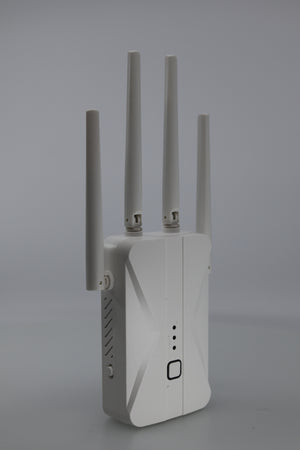
WiFi Extender Signal Booster – AC1200Mbps Dual Band with Ethernet Port
Ask a question
Estimate delivery times: 3-7 days.
Return within 30 days of purchase.
Guaranteed Safe Checkout
WiFi Extender Signal Booster – AC1200Mbps Dual Band with Ethernet Port
Condition: Open Box
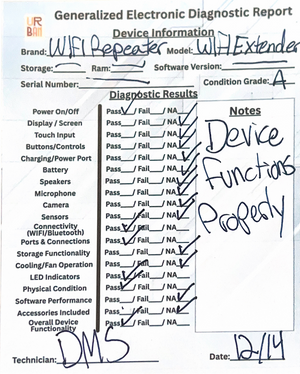
Open Box, Grade A, Functions Properly, No Sign Of Damage
Enhance your WiFi at home with the AC1200Mbps Dual Band WiFi Extender Signal Booster. Get wide coverage, fewer dead zones, and fast connections for your devices. Reliable internet throughout your home or office is now possible and easy to maintain.
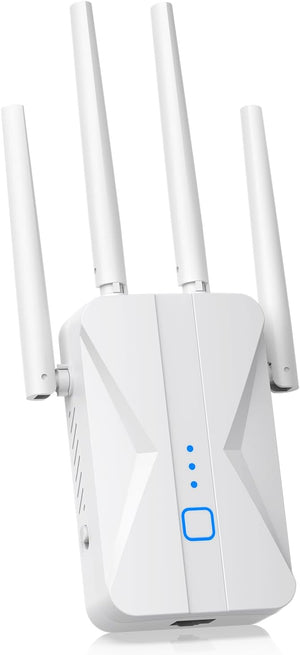
This WiFi Extender delivers exceptional signal strength across two frequency bands, 2.4GHz and 5GHz, giving you flexibility and stability. The four powerful antennas work together to expand your WiFi coverage up to 10,000 square feet. Enjoy a steady internet connection whether you are relaxing in the backyard, working in the garage, or upstairs in your home office.
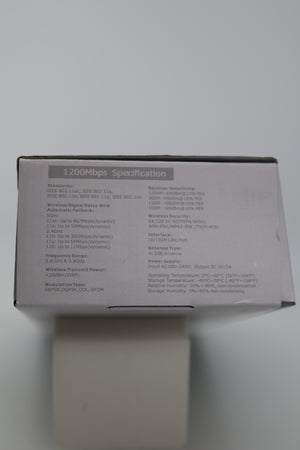
With dual-band mode, the booster reaches speeds up to 300Mbps on 2.4GHz and 867Mbps on 5GHz. These speeds help make HD video streaming and online gaming smooth, minimizing buffering or lag. Need to transfer large files? With this WiFi extender, downloads finish faster and video calls stay clear. Connect multiple devices at once. Your tablets, phones, laptops, and smart home gadgets stay online without interruption.
The WiFi Extender Signal Booster comes with several operation modes for maximum flexibility. Use it as a repeater to extend your current signal, switch to access point mode for wired networks, or even use it as a router in smaller spaces. The built-in Ethernet port brings extra stability to devices that need a secure connection. This feature is perfect for gaming consoles and smart TVs that demand consistency.
Easy setup is a standout feature. The WPS button streamlines connection to your existing router. Push a button, and you’re almost done. If you prefer, the web interface provides step-by-step help for manual setup, with clear onscreen instructions. Setup takes only a few minutes. If you need help, the included quick-start guide and LED indicator lights make troubleshooting easy.
This extender is compatible with many routers and internet gateways. It supports all standard wireless protocols, including 802.11a/b/g/n/ac models. Most brands work, including popular options from Netgear and TP-Link. You do not have to change your current setup or install new software. Just add this booster and enjoy immediate results.
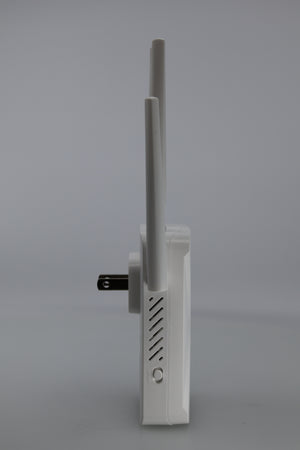
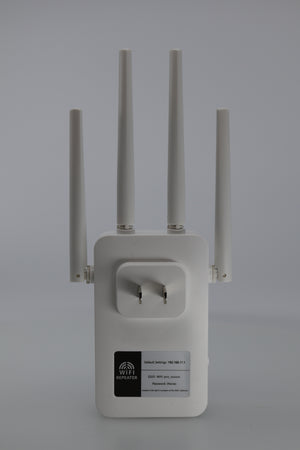
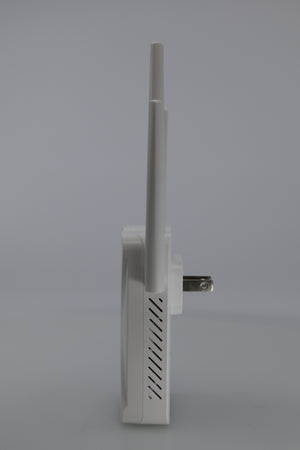
The compact design means you can place this booster anywhere a plug fits. Its clean white look blends in with any room. Durable construction ensures longevity even with daily use. If you move or redecorate, simply unplug it and choose a new power outlet.
Looking to maximize performance? Place the WiFi Extender midway between your router and the area with weak signal. Make sure the antennas are upright. Avoid placing the booster inside cabinets or behind thick walls as this can lower its range and speed. Regularly check for firmware updates to keep your device running smoothly and securely.
Frequently Asked Questions (FAQ)
-
Question: How do I set up the WiFi Extender Signal Booster?
Answer: Setting up the WiFi Extender Signal Booster is easy. First, plug the device into a power outlet within range of your WiFi network. Use the WPS button on both the extender and your router for automatic pairing. Some setups require no password. If the WPS option is unavailable or you want more control, connect to the extender’s default WiFi network using a phone or laptop. Go to the setup page using your browser and follow simple steps shown. The process takes just a few minutes. If you get stuck, a quick-start card is included for extra help with troubleshooting. -
Question: Can this extender work with any router?
Answer: The WiFi Extender Signal Booster is built for broad compatibility. It integrates with nearly every router or gateway, including older and new models. It fully supports major standards like 802.11b/g/n/ac, which most homes and offices use today. Even if you upgrade your network in the future, your extender should keep working without any new setup or adjustments. This helps if you own equipment from different brands, for instance TP-Link or Netgear. -
Question: Will the extender maintain high speeds across its coverage area?
Answer: This WiFi extender is engineered for solid performance and fast connections. It can provide up to 300Mbps on 2.4GHz and up to 867Mbps on 5GHz. Strong speeds are possible in most areas, but many things affect results. Large furniture, thick walls, and appliances can block or slow WiFi signals. Try placing your extender high off the ground and away from electronics like microwaves or cordless phones. A central location in your home works best for most users. For extra-fast speeds, use a wired Ethernet connection to your devices. -
Question: What devices can I connect to the WiFi Extender Signal Booster?
Answer: You can connect almost any WiFi-enabled device. This includes common items like smartphones and laptops, along with tablets and gaming consoles such as Xbox or PlayStation. Smart TVs and streaming boxes work as well. Many smart home products, like doorbells or security cameras, also benefit from stronger coverage. Most users see an immediate improvement, and multiple devices can connect at the same time without slowing each other down. -
Question: How do I know if the booster is working properly?
Answer: Built-in LED indicator lights show you the extender’s status. Solid lights mean a good connection. Blinking or red lights may signal a setup issue or weak node. For best results, check signal strength on your device in different rooms. High bars on the WiFi icon means the booster is working. Test by streaming a video or visiting a website. Fast loading means your extender performs as expected.
The WiFi Extender Signal Booster is a smart investment for anyone seeking better signal and convenience. It’s perfect for eliminating dead spots and weak connections in houses, apartments, and offices. For more info about how extenders work, see the guide on Wireless Repeaters.
Explore our electronics Collection
Keywords: WiFi, Extender, Signal, Booster
Our happy customers
Real reviews from real customers


