


USB3.0 KVM Switch HDMI 4K@60Hz for 4 Computers – Seamless Multi-Device Control
Ask a question
Estimate delivery times: 3-7 days.
Return within 30 days of purchase.
Guaranteed Safe Checkout
USB3.0 KVM Switch HDMI 4K@60Hz for 4 Computers – Seamless Multi-Device Control
Condition: Open Box, Grade A, Functions Properly
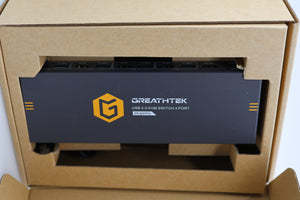
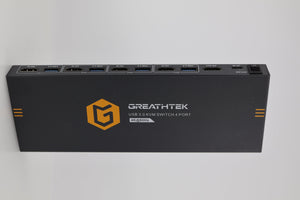
Control up to 4 computers using the USB3.0 KVM Switch HDMI 4K@60Hz. Quickly switch systems with a single monitor, keyboard, and mouse. This user-friendly device boosts efficiency in any multi-device workspace.
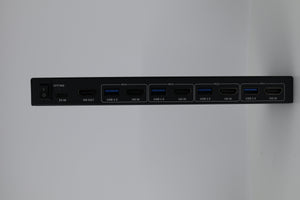
This KVM switch is built for speed and clarity. It supports 4K@60Hz HDMI for ultra-sharp visuals and can also handle lower resolutions like 1080p or 3840x2160@30Hz. Three USB3.0 ports make it fast to share keyboards, mice, and other peripherals. Enjoy transfer speeds up to 5Gbps, which cuts wait times for file transfers or printing. Learn about KVM switches on Wikipedia.
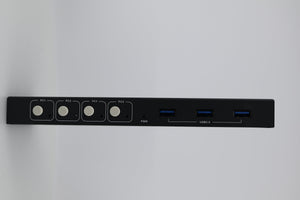
Switching between computers is simple. Just press one of the front panel buttons: PC1, PC2, PC3, or PC4. An LED shows which computer is active. The switch only supports button switching, and does not use hotkey switching. This makes it very reliable and easy to use. No extra software or drivers are necessary.
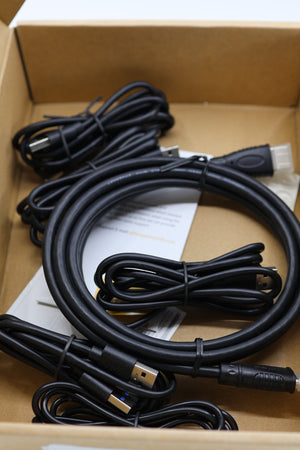
High-quality copper contacts ensure durability and a long lifespan. The KVM switch is compact, about 9.92 x 7.2 x 2.72 inches, so it saves desk space. At about 1 pound, it’s easy to move or reposition. The package includes one HDMI cable, four USB 3.0 cables, and a power cable. This gives you everything you need right away for setup.
The USB ports allow sharing several devices, making this an excellent tool for multi-device setups. Use USB flash drives, cameras, printers, or scanners across different computers. When switching, all your connected USB devices follow to the active computer.
Installation is truly plug-and-play. Connect everything with the included cables, and you’re ready. The device works with Windows, Mac OS, and Linux, making it flexible for any professional or home office setup. No need to download drivers or special programs.
This model also features adaptive EDID support. The KVM adapts to your display’s settings for the best resolution, with no manual configuration. If you have several display types, the device switches between them smoothly. For best quality, always use high-end HDMI cables. Avoid conversion cables and unnecessary switchers, as these could harm the display.
To support high-power peripherals, there’s an independent 5V power supply port. This ensures steady performance when powering devices like external hard drives or cameras. The KVM is built with a heat sink to protect against heat damage and extend the lifespan of the unit.
The KVM switch is designed for reliability. Copper contacts, solid construction, and heat dissipation work together to deliver consistent results. If you see flickering or resolution loss, double check your HDMI cable quality. Try direct monitor-to-computer tests if you experience issues, to isolate the problem.
Expand your productivity further with more compatible electronics in our electronics Collection.
Frequently Asked Questions (FAQ)
-
Question: How do I switch between computers using this KVM switch?
Answer: Switching is easy and direct. Each computer is assigned to a button on the front labeled PC1, PC2, PC3, and PC4. To control a different system, press its button. The LED next to the button tells you which one is active. This method avoids complicated software and works right out of the box. It is quick and intuitive for users with any level of tech experience. -
Question: Can I switch using keyboard hotkeys?
Answer: This KVM does not support switching by keyboard hotkeys. It is designed for button-only control to avoid accidental switches. This design lowers the chance of errors during critical tasks. It makes operation clear and reliable, keeping focus on physical accessibility and simplicity. -
Question: Which USB devices can I share through the USB 3.0 ports?
Answer: The KVM’s three front USB 3.0 ports allow many types of devices. Connect keyboards, mice, external drives, printers, or even cameras. When you press a button to switch systems, these USB devices will leap to the new computer. USB 3.0 support means rapid data transfer, so external drives work at their best speed. This is ideal for professionals who depend on multiple devices and want to cut down setup clutter. -
Question: What should I do if my display is flickering or losing resolution?
Answer: First, check that you are using high-quality HDMI cables. Avoid any adapters or signal converters. They can lead to flickering or image problems. Test connecting your monitor directly to your computer. If the display issue disappears, the issue may be with the KVM or cables. Always ensure all connected devices are compatible with 4K@60Hz when using high resolutions.
The USB3.0 KVM Switch HDMI 4K@60Hz combines KVM power with crisp HDMI display and fast USB3.0 connections. Simplify your setup, save space, and boost efficiency with this essential tool. Browse our full electronics Collection to discover more great technology for your office or home. Keywords: KVM, switch, USB3.0, HDMI
Our happy customers
Real reviews from real customers


