


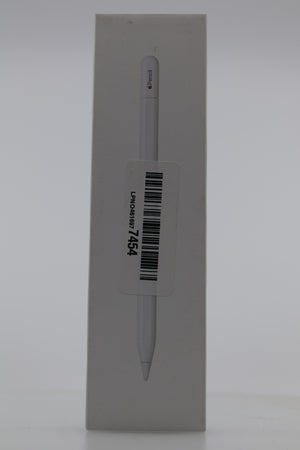
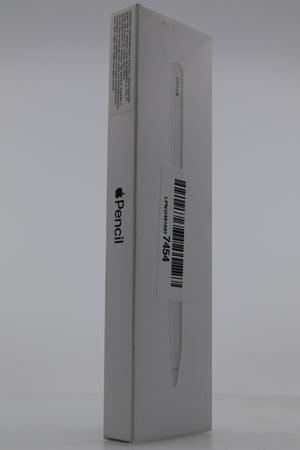
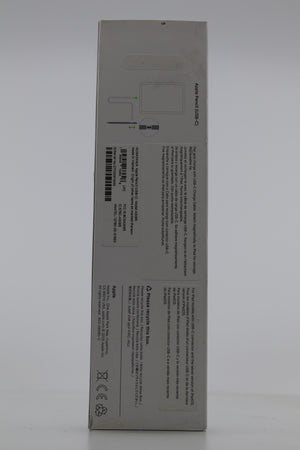
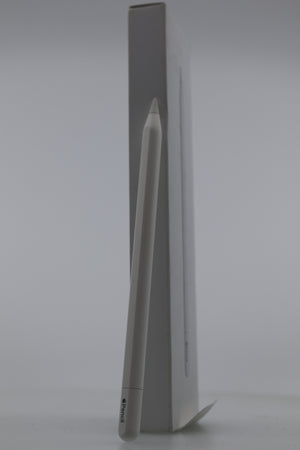
Apple Pencil (USB-C): Pixel-Perfect Precision for Note-Taking and Drawing
Ask a question
Estimate delivery times: 3-7 days.
Return within 30 days of purchase.
Guaranteed Safe Checkout
Apple Pencil (USB-C): Pixel-Perfect Precision for Note-Taking and Drawing
Condition: Open Box, Grade A, Functions Properly
Experience unparalleled precision and responsiveness with the Apple Pencil (USB-C), designed to transform your iPad into a versatile tool for note-taking, sketching, and document annotation. Its pixel-perfect accuracy and tilt sensitivity make it an essential accessory for students, professionals, and creatives alike.
The Apple Pencil (USB-C) boasts a sleek, minimalist design with a matte finish that provides a comfortable grip for extended use. Its flat edge not only prevents rolling but also allows for magnetic attachment to compatible iPad models, ensuring secure storage when not in use. The innovative sliding cap reveals a USB-C connector, facilitating easy pairing and charging via a USB-C cable. This thoughtful design eliminates the need for removable caps, reducing the risk of misplacement.
Compatibility is a key feature of the Apple Pencil (USB-C). It supports a wide range of iPad models, including:
- iPad Pro 13-inch (M4)
- iPad Pro 12.9-inch (3rd to 6th generation)
- iPad Pro 11-inch (1st to 4th generation)
- iPad Air 13-inch (M2)
- iPad Air 11-inch (M2)
- iPad Air (4th and 5th generation)
- iPad mini (6th generation)
- iPad (10th generation)
This extensive compatibility ensures that users across various iPad models can enjoy the benefits of the Apple Pencil (USB-C).
When it comes to performance, the Apple Pencil (USB-C) excels with low latency and tilt sensitivity, providing a natural and responsive writing and drawing experience. While it lacks pressure sensitivity, the tilt feature allows for shading and varied line thickness, catering to the needs of artists and designers. The absence of pressure sensitivity may be a consideration for professional artists seeking advanced control, but for general note-taking and sketching, the Apple Pencil (USB-C) delivers exceptional performance.
Charging and pairing are streamlined through the USB-C connector. Simply connect the Apple Pencil to your iPad using a USB-C cable to pair and charge. Although the device magnetically attaches to the iPad for convenient storage, it does not support wireless charging. This design choice prioritizes affordability and broad compatibility, making the Apple Pencil (USB-C) an accessible option for a wide range of users.
In everyday use, the Apple Pencil (USB-C) enhances productivity and creativity. Students can take handwritten notes, annotate lecture slides, and sketch diagrams directly on their iPads, streamlining their study process. Professionals can sign documents, mark up reports, and create presentations with ease, reducing reliance on paper-based workflows. Creatives can explore digital art, design, and illustration, leveraging the precision and responsiveness of the Apple Pencil (USB-C) to bring their ideas to life.
For those seeking a reliable and affordable stylus, the Apple Pencil (USB-C) offers a compelling combination of design, compatibility, and performance. Its thoughtful features and seamless integration with iPadOS make it a valuable tool for enhancing your digital experience.
Frequently Asked Questions (FAQ)
- Question: Is the Apple Pencil (USB-C) compatible with all iPad models?
- Answer: The Apple Pencil (USB-C) is compatible with a wide range of iPad models, including iPad Pro 13-inch (M4), iPad Pro 12.9-inch (3rd to 6th generation), iPad Pro 11-inch (1st to 4th generation), iPad Air 13-inch (M2), iPad Air 11-inch (M2), iPad Air (4th and 5th generation), iPad mini (6th generation), and iPad (10th generation). It's important to verify your specific iPad model's compatibility before purchasing.
- Question: Does the Apple Pencil (USB-C) support pressure sensitivity?
- Answer: The Apple Pencil (USB-C) does not support pressure sensitivity. However, it features tilt sensitivity, allowing users to create shading effects and vary line thickness by adjusting the angle of the pencil. This functionality caters to a range of creative applications, though professional artists seeking advanced control may prefer models with pressure sensitivity.
- Question: How do I charge and pair the Apple Pencil (USB-C) with my iPad?
- Answer: To charge and pair the Apple Pencil (USB-C), slide up the cap to reveal the USB-C connector and connect it to your iPad using a USB-C cable. This connection facilitates both pairing and charging. Note that while the Apple Pencil magnetically attaches to compatible iPad models for convenient storage, it does not support wireless charging.
For more information on compatible iPad models and detailed specifications, visit the official Apple Support page: Apple Pencil (USB-C) - Tech Specs
Explore our Electronics Collection for more innovative accessories to enhance your digital experience.
In summary, the Apple Pencil (USB-C) offers a harmonious blend of design, functionality, and affordability. Its compatibility with a broad range of iPad models, combined with features like tilt sensitivity and magnetic attachment, make it a valuable tool for various users. Whether you're a student, professional, or creative, the Apple Pencil (USB-C) is designed to elevate your iPad experience, providing the precision and responsiveness needed for your tasks.
By integrating seamlessly with iPadOS and supporting a multitude of applications, the Apple Pencil (USB-C) empowers users to unlock their full potential, transforming the iPad into a dynamic platform for creativity and productivity. Its thoughtful design and user-centric features underscore Apple's commitment to enhancing the digital experience for all users.
Our happy customers
Real reviews from real customers


