


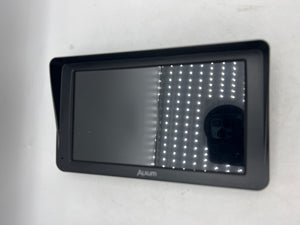
Alxum 7" Wireless Android Auto & Apple CarPlay Screen – HD Touchscreen Car Display with Backup Camera & GPS Navigation
Ask a question
Estimate delivery times: 3-7 days.
Return within 30 days of purchase.
Guaranteed Safe Checkout
Alxum 7" Wireless Android Auto & Apple CarPlay Screen – HD Touchscreen Car Display with Backup Camera & GPS Navigation
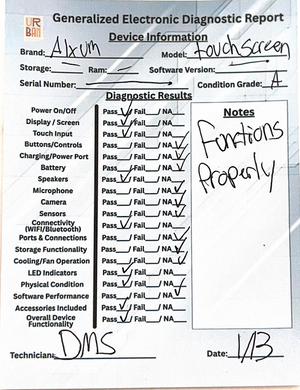
Condition: Open Box – Grade A. No sign of use or damage. Fully functional and tested.
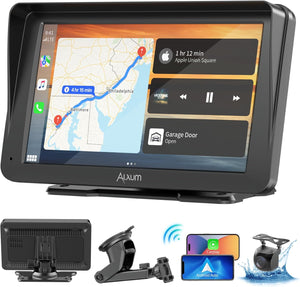
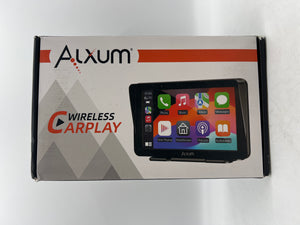
The Alxum 7" Wireless Android Auto & Apple CarPlay Screen improves your car with a bright HD touchscreen, fast wireless connections, and easy smartphone pairing. Enjoy safe hands-free access to navigation, music, maps, calls, and more with simple controls. Stay focused on the road while your driving experience becomes smarter and more connected.
This car display features a crystal-clear 7-inch HD touchscreen with 1024 x 600 resolution. Every icon appears sharp, and visual details are easy to see even in sunlight. This display works quickly, responding to every touch with no lag. Adjust settings, switch songs, or launch maps with one tap. Its portable design lets you move the system between vehicles when needed, giving you flexibility for road trips or shared cars.
Wireless connectivity is a highlight of the Alxum CarPlay Screen. Compatible with both Android Auto and Apple CarPlay, it connects to your phone over Bluetooth or Wi-Fi—no tangled cables required. Use trusted apps like Google Maps, Waze, Apple Maps, Spotify, or Podcasts without holding your phone. Built-in Siri and Google Assistant voice control let you ask for directions, reply to messages, or select music, all by speaking naturally. These tools make every trip smoother and safer, with no distractions from driving.
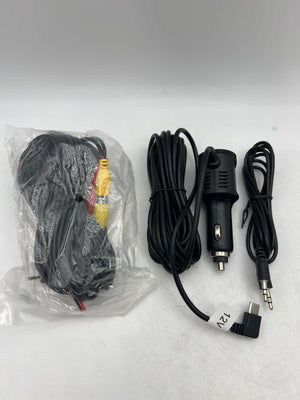
The included waterproof HD backup camera increases parking safety. Shift your car into reverse, and the wide-angle camera view appears instantly. See obstacles, curbs, or children behind your vehicle before moving. This reduces risk during parallel parking or tight spaces. Setup is straightforward, and the camera works well in both sunny and rainy conditions. Having extra visibility makes every parking job easier, whether for daily commutes or family outings.
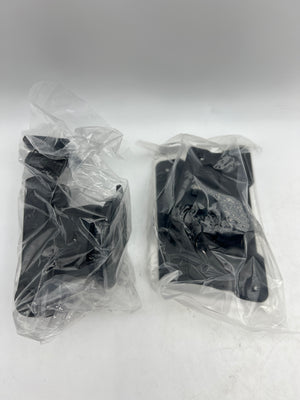
Installation is quick with the strong, adjustable sticky mount. Attach it to the dashboard or windshield for a stable fit. This car display fits many vehicle types: sedans, trucks, vans, RVs, campers, and trailers. If you upgrade your car, simply remove the unit and reinstall it elsewhere. All necessary cables and a car charger are included in the package to speed up setup.
Expand your entertainment with Mirror Link. Mirror your smartphone’s display straight to the car screen—watch real-time GPS, YouTube, or TikTok when parked. Streamlined audio options let you choose Bluetooth, FM transmitter, or AUX. Connect to almost any vehicle sound system for loud, clear playback. Experience movies, calls, or guidance without hassle.
Additional technology improves comfort. The unit auto-dims for night driving. Touch controls are large and easy to press, reducing errors while moving. Software updates keep your system secure and compatible. Help guides are built in, so first-time users get support every step of the way.
Frequently Asked Questions (FAQ)
-
Question: What steps do I follow to install the Alxum 7" Wireless Android Auto & Apple CarPlay Screen?
Answer: Installation is designed to be straightforward so users can do it themselves. First, select a clean, smooth area on your dashboard or windshield for the sticky mount. Once you secure the mount, clip the display unit in place. Next, plug in the provided car charger to your vehicle’s power port. Follow the simple on-screen instructions to pair your smartphone over Bluetooth or Wi-Fi. Most installations take only a few minutes. Suitable for cars, vans, trucks, and even campers. No special tools or permanent changes needed. -
Question: Does the Alxum CarPlay Screen package include a backup camera, and how does it help?
Answer: The package comes with a waterproof HD backup camera. Mount the camera at the rear of your vehicle following the included instructions. When the car shifts into reverse, the display automatically switches to the rear camera feed. A wide field of view helps spot low obstacles, small children, or pets. HD clarity assists in low light and harsh weather, making parking safer in crowded city streets or at night. The camera is tested for durability and remains reliable in heavy rain. -
Question: Can voice commands be used with this display? How do they improve driving safety?
Answer: Yes, this screen is fully compatible with voice assistants, including Siri and Google Assistant. Once your phone connects to the unit, you can activate voice controls by tapping the voice icon or using your car’s steering wheel button if available. Speak commands such as “Navigate home,” “Send a text,” or “Play music.” Keeping your hands free and gaze forward means fewer distractions. This increases safety and follows many new traffic safety laws. If you are new to voice controls, help screens guide you through first use. -
Question: What audio options can I use to connect the Alxum CarPlay Screen to my car speakers?
Answer: Multiple flexible audio options are included. Connect the display to your vehicle speakers through Bluetooth if your audio system supports it. For cars without Bluetooth, use the built-in FM transmitter—set the same FM frequency on your radio and device for wireless audio. There's also an AUX output option. This gives you clear sound for music, calls, and GPS alerts, regardless of your car’s audio setup or age.
The Alxum 7" CarPlay Screen adds modern smart features to almost any vehicle. Gorgeous touchscreen visuals, flexible wireless pairing, safety backup camera, and seamless voice control give you more confidence on every drive. Whether for daily commutes or long vacations, your drives stay organized and enjoyable with less hassle and more control over your environment.
Discover more about how CarPlay and Android Auto enhance vehicle safety and entertainment on Wikipedia. Explore compatible electronics in our collection.
Keywords: Alxum, CarPlay, Android Auto, touchscreen
Our happy customers
Real reviews from real customers


